
As of 1st July 2026, the Azure DevOps issuer for workload identity federation is officially deprecated, with full retirement set for 1st July 2027. If that sentence meant nothing to you, here’s the short version: any Azure Pipelines Service Connection you created before late 2025 probably needs attention, and if you ignore it, those pipelines will stop authenticating to Azure a year from now.
The portal will happily convert them for you, one Service Connection at a time, a couple of minutes each. That’s perfectly civilised if you have five. If you have several hundred (or more than about 10 if you’re anything like me) then this isn’t going to work.
But luckily for you I’ve gone through the hassle of figuring out how to programmatically call the migration.
What’s actually changing
Workload identity federation is the secretless way Azure Pipelines authenticates to Azure. Instead of storing a service principal secret that expires and takes a pipeline down with it, the Service Connection trades a short-lived token for access. That trust is anchored by a Federated Credential on an App Registration, and every federated credential names an issuer, the authority that mints the token.
Older connections use the Azure DevOps issuer, the one with the https://vstoken.dev.azure.com prefix. Microsoft is standardising on the Microsoft Entra issuer (https://login.microsoftonline.com) across its services, so the old issuer is on the way out. New connections have used the Entra issuer since November 2025, which is why this only bites the older ones.
One important boundary to keep in mind though as DevOps won’t indicate this for you, the deprecation only covers single-tenant Entra apps and Managed Identities in the Azure public cloud. Multitenant applications and the sovereign clouds are explicitly out of scope, and the Azure DevOps issuer keeps working for them.
Programmatically calling the migration
The portal’s Update button isn’t doing anything magical. Under the bonnet it fires a single REST call against the Service Connection, with an operation of MigrateToEntraIssuer. There’s no documented API for it that I could find, but you can watch the portal make the call in your browser’s dev tools and replay it yourself.
The script below runs in two phases. First it pre-creates the Entra federated credential on each App Registration, waits a moment for it to propagate, then calls the migrate operation.
#Requires -Version 7.0#Requires -Modules Az.Accounts, Az.Resources<#.SYNOPSIS Bulk-migrates Azure DevOps WIF service connections from the deprecated Azure DevOps issuer to the Microsoft Entra issuer. Phase 0 pre-creates the Entra-issuer federated identity credential on each in-scope single-tenant app registration. Phase 1 (parallel, REST): calls operation=MigrateToEntraIssuer and reads the outcome from operationStatus.state..DESCRIPTION The Entra-issuer FIC uses: Issuer : https://login.microsoftonline.com/<tenantId>/v2.0 Subject : /eid1/c/pub/t/<b64url(tenantId)>/a/<b64url(AzureDevOpsAppId)>/sc/<orgId>/<endpointId> Audience : api://AzureADTokenExchange The subject is the flexible-FIC format - NOT the old sc://<org>/<project>/<name>. b64url segments are base64url of the GUID byte array (Guid.ToByteArray), padding stripped. The a/ segment is the Azure DevOps first-party app id (499b84ac-..)..NOTES - Single-tenant apps only. Multitenant (AzureADMultipleOrgs) are out of scope and skipped. - Run with $WhatIfMode = $true first; it prints the per-connection plan without changing anything. - 'c/pub' assumes Azure public cloud.#># ---------------------------------------------------------------------------# Parameters# ---------------------------------------------------------------------------$OrganizationUrl = 'https://dev.azure.com/redstorltd'$EndpointIds = @() # If empty the script will enumerate all WIF connections in the org. Enter individual service connection IDs to limit the scope$ApiVersion = '7.1'$ThrottleLimit = 5 # parallel migrate calls$PropagationSeconds = 90 # wait between FIC creation and migration$WhatIfMode = $true # Set to $false to execute the migration. $true prints the plan only.$TenantId = '' # Required, should be set to your Entra ID Tenant$AdoAppId = '499b84ac-1321-427f-aa17-267ca6975798' # Azure DevOps first-party app id (constant for all connections)# ---------------------------------------------------------------------------# Connect + context# ---------------------------------------------------------------------------if (-not (Get-AzContext)) { Connect-AzAccount | Out-Null }# Azure DevOps REST auth.# Az.Accounts 5.x returns .Token as a SecureString, so decode it to plain text.$adoToken = (Get-AzAccessToken -ResourceUrl '499b84ac-1321-427f-aa17-267ca6975798' -AsSecureString).Token$headers = @{ Authorization = "Bearer $(ConvertFrom-SecureString $adoToken -AsPlainText)" }# Organisation (instance) ID - the <orgId> segment of the subject.$OrgId = (Invoke-RestMethod -Headers $headers -Method Get -Uri "$OrganizationUrl/_apis/connectionData").instanceIdif($null -eq $OrgId) { throw "Failed to retrieve orgId from $OrganizationUrl/_apis/connectionData" }Write-Host "Org '$(($OrganizationUrl -split '/')[-1])' (id $OrgId), tenant $TenantId." -ForegroundColor Green# Base64url of a GUID's byte array (matches the ADO flexible-FIC subject encoding).function ConvertTo-Base64Url([guid]$Guid) { [Convert]::ToBase64String($Guid.ToByteArray()).TrimEnd('=').Replace('+','-').Replace('/','_')}# ---------------------------------------------------------------------------# Enumerate candidate connections (azurerm + WIF)# ---------------------------------------------------------------------------Write-Host "Enumerating projects and service connections..." -ForegroundColor Cyan$projects = (Invoke-RestMethod -Headers $headers -Method Get -Uri "$OrganizationUrl/_apis/projects?api-version=$ApiVersion").value$candidates = foreach ($project in $projects) { $eps = (Invoke-RestMethod -Headers $headers -Method Get ` -Uri "$OrganizationUrl/$($project.id)/_apis/serviceendpoint/endpoints?type=azurerm&api-version=$ApiVersion").value foreach ($ep in $eps) { if ($ep.authorization.scheme -eq 'WorkloadIdentityFederation' -and $ep.authorization.parameters.workloadIdentityFederationSubject.StartsWith("sc://")) { [pscustomobject]@{ EndpointId = $ep.id; Name = $ep.name; ProjectName = $project.name } } }}$candidates = $candidates | Sort-Object EndpointId -Uniqueif ($EndpointIds.Count -gt 0) { $candidates = $candidates | Where-Object EndpointId -in $EndpointIds }Write-Host "Found $($candidates.Count) WIF connection(s) to consider." -ForegroundColor Green# ---------------------------------------------------------------------------# Phase 0: resolve app, skip multitenant, compute issuer/subject, create FIC# ---------------------------------------------------------------------------$ready = [System.Collections.Generic.List[object]]::new()$skipped = [System.Collections.Generic.List[object]]::new()foreach ($c in $candidates) { $base = "$OrganizationUrl/$($c.ProjectName)/_apis/serviceendpoint/endpoints/$($c.EndpointId)" $ep = Invoke-RestMethod -Headers $headers -Method Get -Uri "$base`?api-version=$ApiVersion" $appObjectId = $ep.data.appObjectId if (-not $appObjectId) { $skipped.Add([pscustomobject]@{ Name = $c.Name; Reason = 'No app object id (managed identity or non-automatic connection)' }); continue } $app = Get-AzADApplication -ObjectId $appObjectId -ErrorAction SilentlyContinue if (-not $app) { $skipped.Add([pscustomobject]@{ Name = $c.Name; Reason = "App $appObjectId not found / no access" }); continue } if ($app.SignInAudience -ne 'AzureADMyOrg') { $skipped.Add([pscustomobject]@{ Name = $c.Name; Reason = "Out of scope - SignInAudience=$($app.SignInAudience)" }); continue } $issuer = "https://login.microsoftonline.com/$TenantId/v2.0" # The a/ segment is the Azure DevOps first-party app id - constant for all connections. $AdoAppSegment = ConvertTo-Base64Url ([guid]$AdoAppId) $subject = "/eid1/c/pub/t/$(ConvertTo-Base64Url $TenantId)/a/$AdoAppSegment/sc/$OrgId/$($c.EndpointId)" $ficName = "ado-entra-$($c.EndpointId)" $exists = Get-AzADAppFederatedCredential -ApplicationObjectId $appObjectId -ErrorAction SilentlyContinue | Where-Object { $_.Subject -eq $subject -and $_.Issuer -eq $issuer } if ($WhatIfMode) { Write-Host "[WhatIf] $($c.Name): would $(if($exists){'reuse'}else{'create'}) FIC then migrate." -ForegroundColor Yellow } elseif (-not $exists) { New-AzADAppFederatedCredential -ApplicationObjectId $appObjectId -Name $ficName -Issuer $issuer -Subject $subject -Audience 'api://AzureADTokenExchange' -ErrorAction Stop | Out-Null Write-Host " Created FIC for '$($c.Name)'." -ForegroundColor DarkGray } $ready.Add([pscustomobject]@{ EndpointId = $c.EndpointId; Name = $c.Name; ProjectName = $c.ProjectName })}if ($skipped.Count) { Write-Host "`nSkipped $($skipped.Count):" -ForegroundColor Yellow; $skipped | Format-Table -AutoSize }if ($WhatIfMode) { Write-Host "`n[WhatIf] $($ready.Count) connection(s) would be migrated. Set `$WhatIfMode = `$false to execute." -ForegroundColor Yellow return}# ---------------------------------------------------------------------------# Propagation wait, then Phase 1: migrate (parallel REST)# ---------------------------------------------------------------------------Write-Host "`nWaiting ${PropagationSeconds}s for FIC propagation..." -ForegroundColor CyanStart-Sleep -Seconds $PropagationSeconds$results = $ready | ForEach-Object -ThrottleLimit $ThrottleLimit -Parallel { $c = $_; $headers = $using:headers; $org = $using:OrganizationUrl; $apiVer = $using:ApiVersion $base = "$org/$($c.ProjectName)/_apis/serviceendpoint/endpoints/$($c.EndpointId)" try { $current = Invoke-RestMethod -Headers $headers -Method Get -Uri "$base`?api-version=$apiVer" -ErrorAction Stop $refs = @(foreach ($r in $current.serviceEndpointProjectReferences) { @{ description = $r.description; name = $r.name; projectReference = @{ id = $r.projectReference.id; name = $r.projectReference.name } } }) $body = [ordered]@{ id = $current.id; type = $current.type authorization = @{ scheme = 'WorkloadIdentityFederation' } serviceEndpointProjectReferences = $refs } | ConvertTo-Json -Depth 10 $resp = Invoke-RestMethod -Headers $headers -Method Put -Uri "$base`?operation=MigrateToEntraIssuer&api-version=$apiVer" -ContentType 'application/json' -Body $body -ErrorAction Stop $state = $resp.operationStatus.state if ($state -match 'Failed') { [pscustomobject]@{ Name = $c.Name; Status = "Failed ($state)"; Detail = $resp.operationStatus.statusMessage } } else { [pscustomobject]@{ Name = $c.Name; Status = "OK ($state)"; Detail = '' } } } catch { [pscustomobject]@{ Name = $c.Name; Status = "HTTP error ($($_.Exception.Response.StatusCode.value__))"; Detail = $_.Exception.Message } }}# ---------------------------------------------------------------------------# Summary# ---------------------------------------------------------------------------$ok = @($results | Where-Object Status -like 'OK*').CountWrite-Host "`nDone. $ok of $($results.Count) migrated, $($skipped.Count) skipped." -ForegroundColor Green$results | Format-Table -AutoSize -Wrap
A couple of things worth knowing if you adapt it. The migrate call returns HTTP 200 even when the server-side migration fails, so the real result lives in operationStatus.state rather than the status code. And the new subject isn’t the old sc://org/project/connection format, it’s the flexible-credential format, where the app segment is Azure DevOps’s own application ID and stays constant for every connection. Get either wrong and validation fails, which is at least a safe way to fail.
Don’t “fix” your multitenant apps
The script intentionally skips multitenant App Registrations, the tempting shortcut is to switch its signInAudience to single-tenant so it qualifies, then convert it like the rest. Please don’t do this blindly.
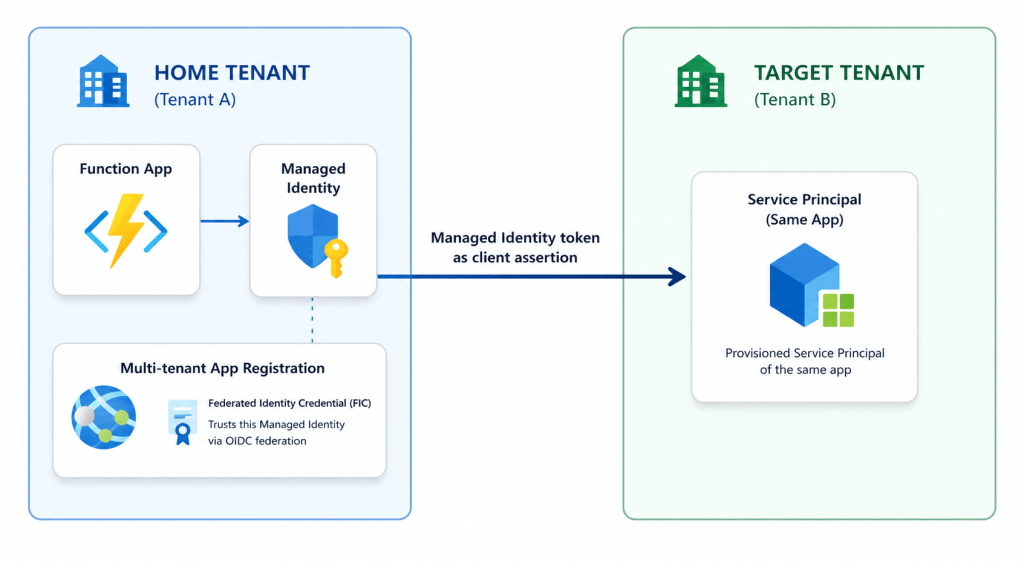
signInAudience is a property of the App Registration, not the Service Connection, so flipping it changes every use of that identity, not just the pipeline you’re looking at. Plenty of apps are multitenant on purpose, most often because they deploy across tenants, an identity homed in one tenant with rights in another. Make it single-tenant and that cross-tenant access will stop working, which is also precisely why Microsoft left these out of scope.
The Entra issuer’s subject is tenant-scoped, and it can’t do the cross-tenant trick the old issuer did.
Getting started
Find your affected connections, test the two-phase run against a single one, confirm a pipeline still authenticates, then let it loose. The canonical walkthrough, including the manual conversion path, is on Microsoft Learn: Convert service connections from the Azure DevOps issuer to the Microsoft Entra issuer. The official announcement with the full timeline is on the Azure DevOps blog.





Leave a comment