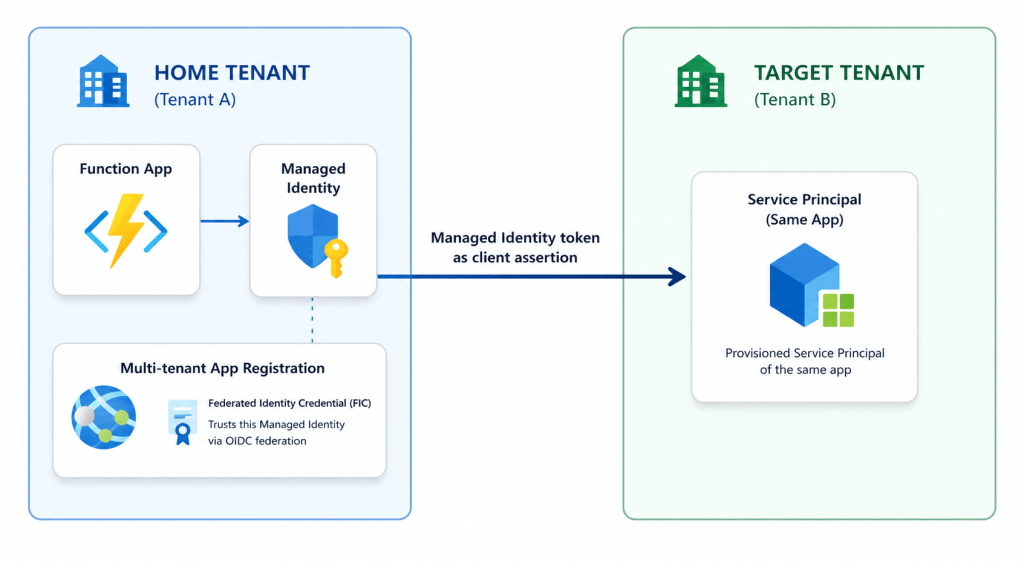
Imagine an automation that has to reach into several Microsoft Entra tenants at the same time, such as a Function App that generates a report from each of your customers directories for example.
The obvious way to authenticate historically may be via client secrets or perhaps certificates if you’re feeling particularly fancy, all stored somewhere, rotated on a tight schedule, quietly but surely turning into a maintenance nightmare as all secret management is wont to do.
Luckily there’s a much cleaner way to handle this nowadays, involving no secrets at all. You simply let the Function App’s (or any other resources) Managed Identity do the heavy lifting, in every tenant.
The Wrong Assumption (How not to do it)
Here’s where most people, reasonably, go wrong. You create the Managed Identity and a multi-tenant app in your home tenant, then you stand up a fresh App Registration in each target tenant with a Federated Identity Credential pointing back at your home tenant’s issuer and your Managed Identity’s subject. It looks symmetrical.
Unfortunately, that doesn’t work, and you’ll see the error shown below when trying to authenticate –
AADSTS700236: Entra ID tokens issued by issuer ‘https://login.microsoftonline.com/<tenant-id>/v2.0’ may not be used for federated identity credential flows for applications or managed identities registered in this tenant.
Entra won’t accept a token minted by one tenant as the federated credential for an app registered in a different tenant. Tenant-to-tenant FIC, in that direction, simply isn’t a thing.
What We Need
So we’ve covered what doesn’t work, but what does? It’s actually surprisingly simple, we just need an Identity, a Multi-Tenant App Reg and a Federated Workload Identity in the home tenant as described below –
- A Managed Identity – An Azure-managed credential attached to a resource like a Function App, so the platform handles the token and you never store a secret.
- A multi-tenant App Registration – An app that can be provisioned into directories other than the one it was created in.
- A Federated Identity Credential (FIC) – A trust rule on an App Registration that says “accept a token from this issuer, with this subject, in place of a secret”
Stitch these together and a single identity can authenticate across many tenants effortlessly.
How to set it up
1. In your home tenant
Create the multi-tenant App Registration ensuring you have the following configuration –
- Redirect URI Configuration –
- Web – any redirect URI works, we can use https://www.microsoft.com for testing purposes.
- Supported account types –
- Multiple Entra ID tenants
- Certificates & Secrets –
- Federated credentials –
- Managed Identity
- Issuer – https://login.microsoftonline.com/<home tenant ID>/v2.0
- Subject identifier – ID of the Managed Identity
- Audience – api://AzureADTokenExchange
- Federated credentials –
Also ensure you add any required Application-type API Permissions.
2. In each target tenant
Register the multi-tenant App Registration in each target tenant, this can be done pretty simply be navigating to a specific URL when logged in as an admin user in the target tenant –
https://login.microsoftonline.com/<target-tenant-id>/oauth2/authorize?client_id=<app registration client ID>&response_type=code&redirect_uri=<redirect uri>
3. At runtime
Your Function App asks its Managed Identity for a token scoped to api://AzureADTokenExchange, then presents that token as a client assertion to the target tenant’s token endpoint. Back comes a Graph token for that tenant.
That last step is the trick, and it’s short:
# --- Editable config -------------------------------------------------------# Tenants to reach. The home tenant (where this Function App's Managed Identity# lives) and every target tenant are reached the same way, through the shared# multi-tenant App Registration below.$tenantIds = @( @{ tenantId = "<target-tenant-1-guid>"; displayName = "Contoso" }, @{ tenantId = "<target-tenant-2-guid>"; displayName = "Fabrikam" })# Client (Application) ID of the multi-tenant App Registration in the home# tenant. Its Federated Identity Credential trusts this Function App's Managed# Identity. The same client ID is presented to every target tenant, each of# which must have admin-consented the app and granted it Graph permissions.$multiTenantAppClientId = "<multi-tenant-app-client-id>"# ---------------------------------------------------------------------------# Az.Accounts 5.x returns tokens as a SecureString. Normalise to plain text for# the HTTP request body and Connect-MgGraph.function ConvertTo-PlainTextToken { param($Token) if ($Token -is [System.Security.SecureString]) { return [System.Net.NetworkCredential]::new('', $Token).Password } return $Token}# Exchange the Managed Identity token for a Graph token in the target tenant.function Get-GraphToken { param( [Parameter(Mandatory)][string] $TenantId, [Parameter(Mandatory)][string] $ClientId ) # 1. Ask the local Managed Identity for a token whose audience is the token # exchange endpoint. This is the assertion, no secret involved. $assertion = ConvertTo-PlainTextToken ( Get-AzAccessToken -ResourceUrl "api://AzureADTokenExchange").Token # 2. Present it to the target tenant's token endpoint as a client_credentials # grant for the multi-tenant app. $body = @{ client_id = $ClientId scope = "https://graph.microsoft.com/.default" grant_type = "client_credentials" client_assertion_type = "urn:ietf:params:oauth:client-assertion-type:jwt-bearer" client_assertion = $assertion } $endpoint = "https://login.microsoftonline.com/$TenantId/oauth2/v2.0/token" (Invoke-RestMethod -Method Post -Uri $endpoint -Body $body ` -ContentType "application/x-www-form-urlencoded").access_token}foreach ($tenant in $tenantIds) { Write-Host "Connecting to $($tenant.displayName)..." $graphToken = Get-GraphToken -TenantId $tenant.tenantId -ClientId $multiTenantAppClientId Connect-MgGraph -AccessToken ($graphToken | ConvertTo-SecureString -AsPlainText -Force) -NoWelcome # ... your per-tenant Graph work here ... Disconnect-MgGraph}
No secret leaves the box, because there isn’t one. The Managed Identity token is the only credential, and it never goes anywhere except your own token exchange.
Getting started
Microsoft made this generally available on 12th May 2025, so it’s safe to build on. The clearest starting point is the GA announcement, followed by the Configure an application to trust a managed identity doc for the FIC setup.
For a low-level, request-by-request walkthrough of the token exchange, Janne Mattila’s Managed Identity access across tenants is excellent, and Arsen Vladimirskiy’s cross-tenant FIC repo is worth a look if you want to reproduce the AADSTS700236 error yourself and watch where it bites.
Also, big thanks to this Learn article which was a big help in figuring out the correct configuration – AADSTS700236: Entra ID tokens issued by issuer ‘https://login.microsoftonline.com/<tenant-id>/v2.0’ may not be used for federated identity credential flows for applications or managed identities registered in this tenant. – Microsoft Q&A






Leave a comment